
Most conversion headaches start small: a browser-side issue, a stale session, or simple URL mistakes. Add YouTube’s own restrictions and throttling, and even a solid tool halts the download, leaving the file nowhere in sight.
Why YouTube to MP3 Converters Fail
Converter failures usually come from one of three sources: the platform itself, the browser environment, or the tool’s own limitations.
YouTube’s own restrictions. YouTube actively discourages third-party downloading, partly to protect ad revenue and creator earnings under the Partner Program, and partly to enforce copyright. It does this through several mechanisms:
- API monitoring that flags and rate-limits unusual automated requests for video or audio data.
- Referrer tracking, which identifies domains sending heavy conversion traffic.
- Browser fingerprinting, which checks browser version, screen resolution, and device signals to spot non-human traffic patterns.
- Content ID matching, which flags copyrighted audio and video even when accessed through a converter.
Once a pattern of automated requests is detected, YouTube applies rate limits across known converter domains — which is why a tool that worked yesterday might fail today with no changes on your end.
Browser and session issues. Old cached scripts, aggressive ad blockers, browser extensions, or an active VPN can all quietly interfere with the scripts a converter needs to run.
Content and format limitations. Fresh uploads, live streams still in progress, private or age-restricted videos, and oversized files often fall outside what an external tool can process, no matter how well the tool itself is built.
Genuine technical faults. Server overload, weak internet connections, malformed URLs, and outdated converter software cause a large share of “broken” complaints that have nothing to do with YouTube’s restrictions at all.
Understanding which category your issue falls into makes troubleshooting far faster — which is where the fixes below come in.
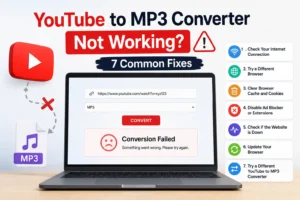
7 Fixes for a YouTube to MP3 Converter That Isn’t Working
1. Recheck and Recopy the Video URL
A large share of failed conversions come down to a broken or partial link. Copy the URL directly from your browser’s address bar, or use the Share button on mobile for a clean link every time. Watch for:
- Shortened links (youtu.be) with a different ID structure than standard URLs
- Playlist URLs that include extra parameters
- Accidentally pasted private or restricted video links
If a conversion fails, reload the page, paste the link fresh, and try again before assuming the tool itself is broken.
2. Confirm the Video Is Public and Available
Before troubleshooting further, check that the video is actually reachable:
- Freshly uploaded videos can take a few minutes for YouTube to generate all file versions
- Live streams and premieres need to finish and settle into archived form
- Private, members-only, or heavily age-restricted videos are outside what external tools can access
- Some content is geo-restricted and simply unavailable in your region
3. Try a Different Browser or a Private/Incognito Window
Cached scripts, privacy blockers, and accumulated extensions can silently break a converter’s functionality. Opening a private or incognito window isolates whether the issue is your browser session or the tool itself. Chrome, Safari, and Edge tend to offer the most consistent compatibility.
4. Clear Your Cache and Cookies
Go to your browser’s settings, find Clear browsing data, select cache and cookies, and restart the browser. This resolves a surprising number of “conversion failed” errors that have nothing to do with the converter’s servers.
5. Disable Extensions and Ad Blockers
Ad blockers sometimes strip out the exact scripts a converter page needs to generate a download link. Disable extensions one at a time — rather than all at once — so you can identify the specific culprit, then retry the link.
6. Disable Your VPN or Proxy
A VPN or proxy can reroute traffic in ways a converter doesn’t expect, causing failed or incomplete conversions. Turning it off temporarily is the fastest way to rule this out.
7. Update Your Converter, Browser, or Try an Alternative Tool
Outdated converter software often carries bugs a newer release has already fixed. If updates don’t help, switching to a different, well-maintained converter can resolve the issue — since server-side tools that adapt to YouTube’s changes tend to stay functional longer than tools that don’t receive updates.
Common Error Messages, Explained
| Error | Likely Cause | What to Try |
| Conversion Failed | Tool couldn’t process the video | Refresh and retry, or recopy the URL |
| Download Not Starting | Browser is blocking the download | Allow pop-ups or switch browsers |
| Video Not Supported | Unsupported format or region block | Confirm the video is public and available in your region |
| Endless Loading | Server overload or a broken script | Reload, wait, or switch tools |
Safety Tips Before You Use Any Converter
- Avoid fake download buttons. Pages cluttered with multiple “Download” buttons are often redirect ads. Use only the tool’s actual conversion button.
- Stick to HTTPS sites and avoid tools that push aggressive pop-ups or unfamiliar browser extensions.
- Check for a clear privacy policy and legitimate contact or support information — reputable tools disclose how they handle your data.
- Don’t install anything a converter site prompts you to download; legitimate web-based converters don’t require software installation.
When the Problem Is Speed, Not a Failure
Slow conversions are usually caused by server load, large file sizes, or a weak internet connection rather than an outright block. Testing with a shorter video, switching to a less congested tool, or restarting the process midway often resolves this without any deeper troubleshooting.
Frequently Asked Questions
Is Using A YouTube To MP3 Converter Illegal?
It depends entirely on the source. Extracting audio from own videos or genuine royalty-free content sits well within the law, but ripping copyrighted music without proper permission crosses straight into trouble. Sticking to Creative Commons material or public domain content remains the safe route every time.
Why Do These Converters Stop Working All The Time?
Platforms rarely sit still — YouTube continuously upgrades its detection systems, which quickly exposes overused tools and outright rule-breaking tools. Once high API traffic or suspicious fingerprints get noticed, trigger blocks follow fast, catching even genuinely well-known tools off guard.
Can I Use A VPN To Keep Converting?
A VPN helps sidestep region restrictions only temporarily. It won’t fool deeper tracking methods built around fingerprinting or ongoing traffic-pattern analysis — treat it as a short-term fix, never a real solution.
What’s The Difference Between Server-Based And Browser Converters?
Server-based converters handle everything through off-device processing, making them genuinely harder to detect. Browser-based tools, often riding on extensions, run on-device instead, which leaves them noticeably easier to block.
Are There Converters That Are Actually Safe?
Yes — reputable converters avoid drowning users in excessive popups and intrusive ads, lean on HTTPS, stay regularly updated, and clearly restrict downloads to genuinely permitted content.
Can YouTube Really Tell If I’m Using A Converter?
Absolutely. Unusual traffic patterns, stored browser data, and referral tracking all feed into detection, and once suspicious behavior gets flagged, expect rate-limiting to follow shortly after.
Is It Legal To Convert YouTube Videos To MP3?
It hinges on copyright status and whether proper permission exists beforehand. Absent that, both downloading and extracting audio step outside legal boundaries.
Why Is My YouTube To MP3 Converter Not Working? (Medium FAQ)
Genuine copyright issues are one culprit, alongside built-in conversion limitations. Beyond that, plain technical issues tied to the browser or outdated converter software account for most remaining failures.
Can I Use A Free YouTube To MP3 Converter?
Sure — but free converters typically come with real limitations, including capped length restrictions and tighter caps on file size overall.
Can I Convert A Whole YouTube Playlist To MP3?
Yes, full playlist conversion works on many tools, though expect longer processing time and a real need for more storage afterward.
How Do I Know If A YouTube Video Is Protected By Copyright?
A copyrighted video usually displays a visible warning message beneath it, flagging third-party content through a standard copyright notice.
How Do I Clear My Cache And Cookies?
Head into your browser settings, open the options menu, and select clear browsing data — from there, target both cache and cookies, adjusting the time range as needed.
What Should I Do If My Browser Isn’t Supported By The Converter?
Simply switch to a different browser that’s confirmed as a supported browser, since these gaps usually trace back to plain browser limitations rather than the tool itself.
Can I Convert A YouTube Video To A Different Audio Format Like WAV Or FLAC?
Yes — both WAV and FLAC are commonly supported, though larger files demand more storage space and can affect device compatibility or player compatibility down the line.
Why Do I Need To Disable My VPN Or Proxy?
A VPN or proxy frequently causes real interference with normal converter access, disrupting how the service handles processing videos in the background.
Can I Convert A Live Stream Video To MP3?
It depends on the tool — a live stream video may or may not have converter support; checking the platform’s own documentation or reaching customer support clarifies it quickly.
Why Is My YouTube To MP3 Converter Not Working? (yttomp3x FAQ)
Frequent YouTube updates expose broken tools fast, and combined with tighter browser restrictions or backend server issues, even a normally reliable converter can stumble.
How Do I Fix A YouTube To MP3 Conversion Error?
Start simple: refresh page, clear cache, and disable ad blockers. If that doesn’t help, try to switch browsers or ultimately switch converters entirely.
Is YouTube To MP3 Not Working Because Of Legal Issues?
Sometimes, yes — certain regions actively enforce restricted converters under strict copyright policy. Far more often, though, it’s plain technical failures rather than genuine legal issues at play.
Why Does YouTube To MP3 Keep Failing Or Showing Errors?
The usual suspects are outdated tools, attempts on unsupported videos, or blocked scripts interrupting things — switching to a trusted converter and confirming it’s a public video resolves most cases.
What Is The Best Way To Fix YouTube To MP3 Not Downloading?
Choose a genuinely fast converter or reliable converter, confirm a stable internet connection, allow browser downloads, and stay alert for fake download buttons disguised as the real thing.


